No guest left waiting.
Mihman uses your restaurant’s existing cameras to see which table is waiting to be greeted, to order, for the bill or to be cleared — and tells the waiter, busser or host right away. No table slips through the cracks at peak hours.
- No new cameras needed
- No footage recorded
- No staff monitoring
Illustrative footage · same table, two different evenings
Without Mihman
Without Mihman: a guest waits at a round table seen from above, hands clasped. Table 9’s wait timer climbs from 1 to 8 minutes and turns from green to yellow, then red. Nobody comes; the guest is still waiting.
With Mihman
With Mihman: same table, same start. In the second minute a “Table 9: waiting for 2 min” alert goes to the waiter. The waiter comes over and serves the plate; the timer stops in green at “Served”.
Floor dashboard
Your whole dining room, on one screen.
Which table is waiting for what, and who was notified — all visible in real time.
Floor dashboard
Waiting now
Real time
- Table 8 · not greeted for 3 min→ Waiter
No tables waiting right now. The floor is calm.
- Occupied
- Free
- Waiting to be greeted
- Waiting to order
- Waiting for the bill
- Ready to clear
- Table ready
What happens at peak hours?
What guests remember is often not the food, but the minutes they waited.
However experienced your team is, nobody can see the whole floor at once on a busy night. Lost minutes always pile up in the same four places.
Guests not greeted
The guests sat down, but no menu, no water. The waiter is at the other end of the room; nobody noticed.
A late bill
The guest is ready to leave and looks around to catch someone’s eye. The last memory of a lovely evening becomes the wait.
A table waiting to be cleared
The table is free but the plates are still on it. A table that could seat guests sits idle.
Guests waiting at the door
There’s a queue at the door and tables inside that could be ready. The host is trying to guess which one will free up, and when.
How it works
From camera to the right person, in three steps.
Step 1: Your existing cameras
We use the security cameras already in your dining room. We place a small device in your restaurant; the footage never leaves it.
Step 2: Each table’s status is understood
The device sees each table’s status: free, just seated, waiting to order, waiting for the bill, waiting to be cleared. It looks at tables, not people.
Step 3: The right person is alerted instantly
If a wait runs long, a short alert goes to the right person’s phone: the waiter for greeting, the busser for clearing, the host for a free table.
Suggested
Table 7: Waiting for the bill
WaiterTable 12: Free · guests at the door
Host
Assigned
Table 4: Ready to clear
BusserTable 9: Not greeted for 4 min
Waiter
Done
Table 3: Waiting to order
Waiter
Your POS stays where it is.
Mihman doesn’t replace it; it works alongside it. You keep taking orders and payments with the system you’re used to.
What are we aiming for?
Guests waiting less, tables turning faster and serving more guests with the same team. We don’t promise this in numbers; we’ll measure it together in your dining room during the pilot.
Privacy & data protection
It sees tables, not people.
Mihman exists to keep your guests from waiting — not to monitor your staff. We didn’t add this principle later; we’re designing the product around it from day one.
Footage goes in, only table status comes out.
Illustrative image · faces and logos blurred for this page
1What the camera sees 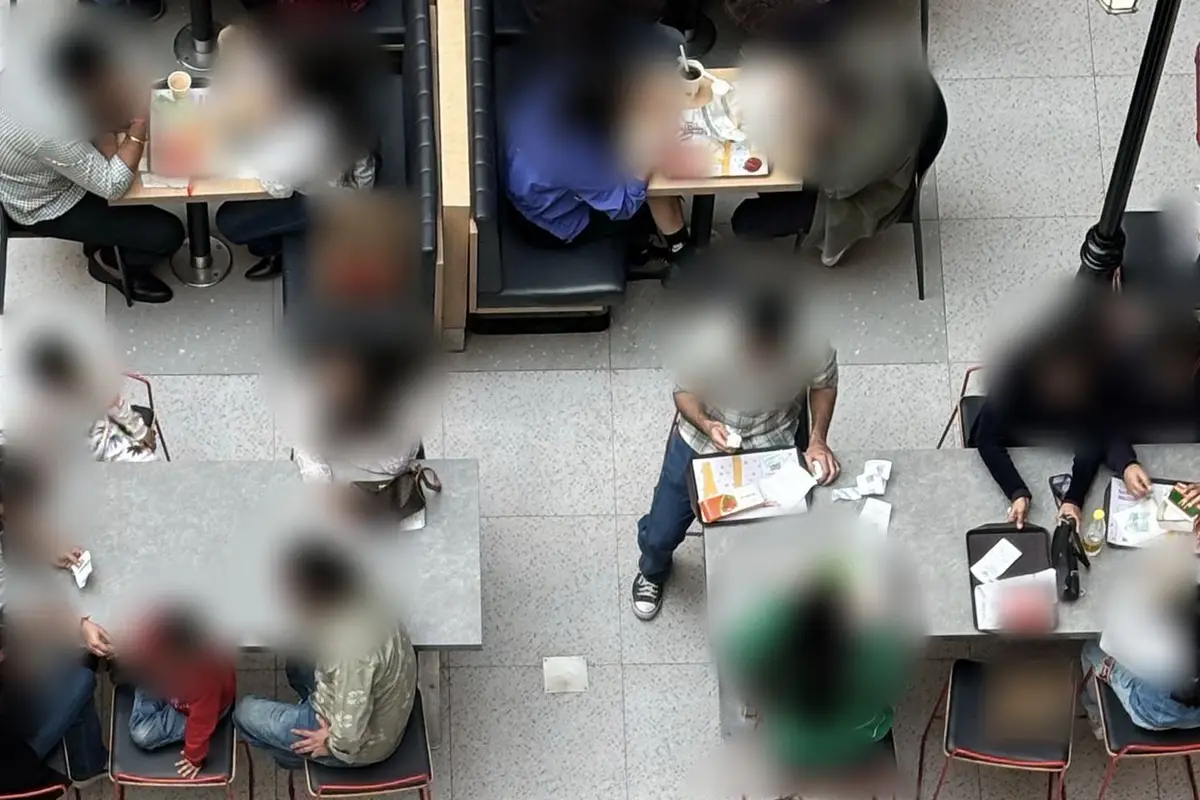
2What Mihman processes 3What leaves the device - 20:41:07Table 7 → awaiting the bill → Waiter
- 20:41:07Table 4 → ready to clear → Busser
- 20:41:09Table 2 → just seated → Waiter
Footage isn’t stored. Only these lines leave the device.
How footage is protected
Processed inside your restaurant
Camera footage is processed in real time on the device in the restaurant. It isn’t sent to the cloud.
No recording
Footage isn’t stored, archived or available for playback. Only table information leaves the device, such as “Table 7: waiting for the bill”.
Never sent abroad
Camera footage never leaves your restaurant, and therefore never leaves Türkiye.
What it never does
No facial or personal recognition
It doesn’t know who anyone is, doesn’t recognize faces and doesn’t follow anyone around the room.
No staff monitoring
No staff performance scores, no per-person reports. Alerts are about tables, not employees.
No audio recording
No microphones are used; conversations aren’t listened to.
We see KVKK — Türkiye’s personal data protection law — not as a box to tick but as the foundation of trust. Before installation, we prepare the notices you need for your staff and guests together with you.
Who it’s for
For restaurants with busy floors and teams on the run.
Multi-branch chains
Brands that want the same welcome and service standard in every branch.
Learn more: Multi-branch chainsBusy, large restaurants
Venues where dozens of tables turn at once and seeing the whole floor gets hard in the evenings and at weekends.
Learn more: Busy, large restaurantsHotel restaurants
Restaurants that serve many guests in a short time at breakfast and dinner, where guest satisfaction shows up in the hotel’s ratings.
Learn more: Hotel restaurantsVenues in tourist areas
Places where guest numbers multiply in season, teams include new colleagues and there’s always a queue at the door.
Learn more: Venues in tourist areas
Free demo
Let us show you Mihman.
In a short video call we show you how Mihman would work on your floor, and we look at your restaurant’s layout and existing cameras together. We’re building Mihman together with our first restaurants: after the demo, we set up a pilot in the dining rooms of those who want one.
What’s in the demo?
A short video call
A short video call at a time that suits you. No installation or preparation needed.
How Mihman would work
Using an example dining room, we show how a table’s status is understood and how the alert reaches the waiter, busser or host.
Your floor and your cameras
We look at your layout together, check whether your existing cameras can see the tables, and clarify whether you’d need any new ones.
After the demo
A pilot setup, if you want one
We’re building Mihman with our first restaurants. After the demo, we run a short pilot in the dining rooms of those who want one and measure waiting times together.
No commitment
The demo is free and doesn’t commit you to anything. We discuss the terms of a pilot setup separately.
FAQ
Frequently asked questions
If your question isn’t here, write it in the form’s “Note” field or send us an email.
Do I need to buy new cameras?
In most cases, no. Mihman is being designed to work with the security cameras already in your dining room. If some tables are outside the cameras’ view, we’ll look at it together in our first meeting and discuss the options.
Is footage recorded?
No. Footage is processed in real time on the device in your restaurant; it isn’t recorded, and it isn’t sent to the cloud or abroad. The only information that leaves the device is a table’s status, for example “Table 7: waiting for the bill”.
Are my employees being monitored?
No. Mihman looks at tables, not people. There’s no facial recognition, no tracking of individuals, no staff performance score and no per-person report. The goal isn’t to supervise anyone; it’s to tell your team “this table is waiting” at peak hours.
Do I have to change my POS system?
No. Mihman doesn’t replace your POS; it works alongside it. You keep taking orders and payments with the system you already use.
Is the demo paid?
No. The demo is free and doesn’t commit you to anything. If you’d like a pilot setup after the demo, we’ll discuss the terms together based on your business’s size and needs.
Is Mihman ready now?
Mihman is in development and is being built together with our first restaurants. In the demo we show how the product would work in your dining room; with those who want one, we set up a pilot and keep building it together during real service.
Let’s look at your dining room together.
Let us show you Mihman in a short video call and look at your floor and cameras together.
Request a free demo